A cycling dashboard, in daily personal use for three months, as a way to understand what my Strava data was showing me.
Ritual
I ride every morning on my Zwift trainer. Monday recovery, Tuesday hard, Wednesday light but long, Thursday hard, Friday steady, long rides on the weekend. FTP test every six to eight weeks. Last year I rode 8,495 miles; since 2020 I've logged 4,905 rides across 42,680.7 miles.
The post-ride loop was the same every time. Open Strava, check the Fitness & Freshness graph — did the line go up or down? I liked seeing three months of context but I never really knew what the line meant. Shouldn't it always be going up? Then into the ride itself: summary tiles top-right, then the analysis stack — Speed, Power, Heart Rate, Cadence, Relative Effort, Power Curve, Zone Distribution.
The charts were clean. They just lacked context.
Diagnosis
Strava's mobile AI tried to fill the gap and mostly didn't. The observations repeated across rides, the tone stayed generic — broad commentary rather than anything that knew me or my week.
The deeper problem was that a single ride raises questions its own data can't answer. How did this ride fit the fitness I've built? How does today compare to the same day last week — Tuesday against Tuesday, not Tuesday against Saturday? Am I tracking to the week's shape? On pace for the month? The ride is where the questions start, but the answers live at different time horizons.
Structure
The ride is the anchor. The tabs are zoom levels out from it.
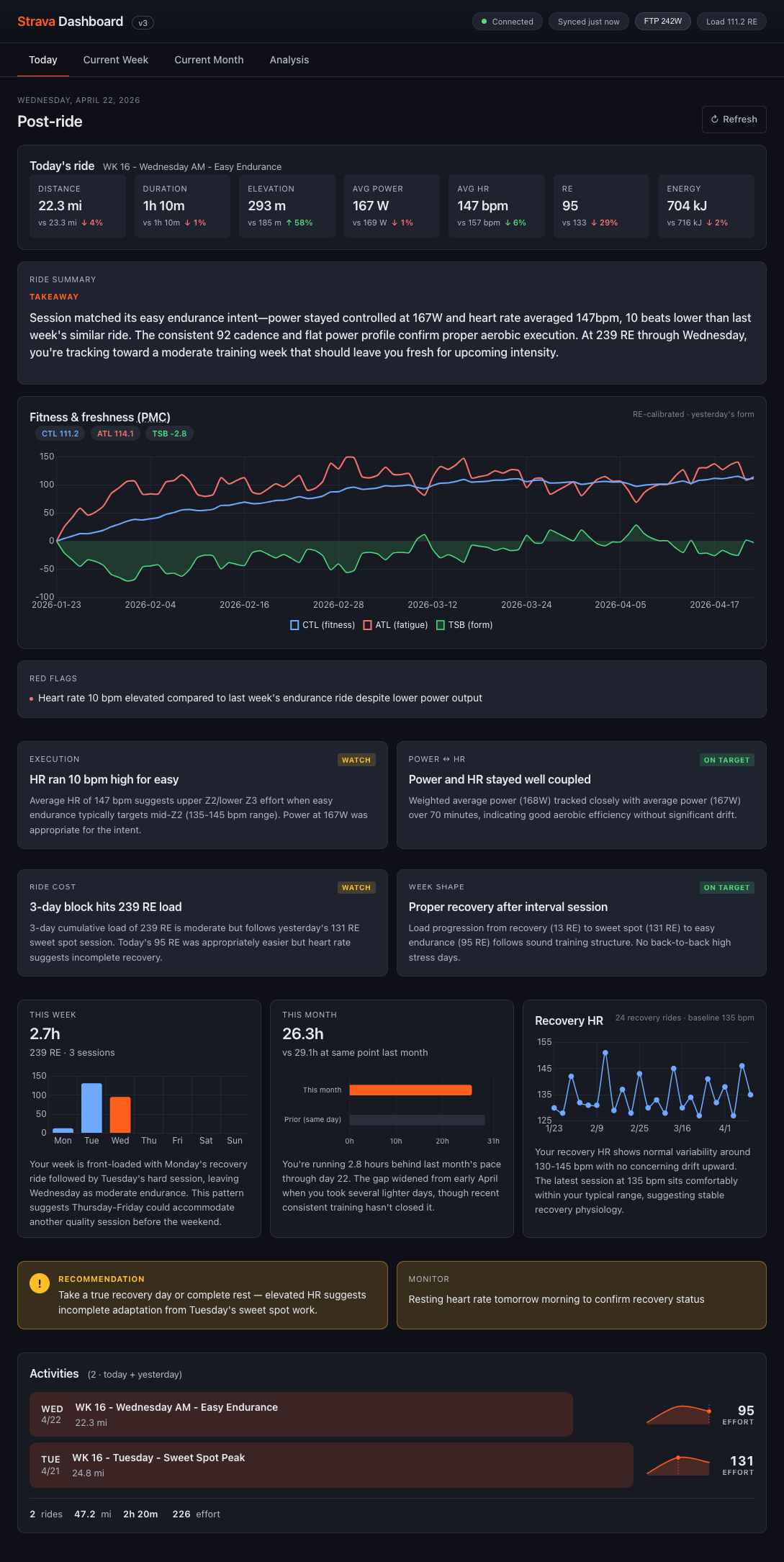
- Today — the ride itself, read against recent context. Did it land?
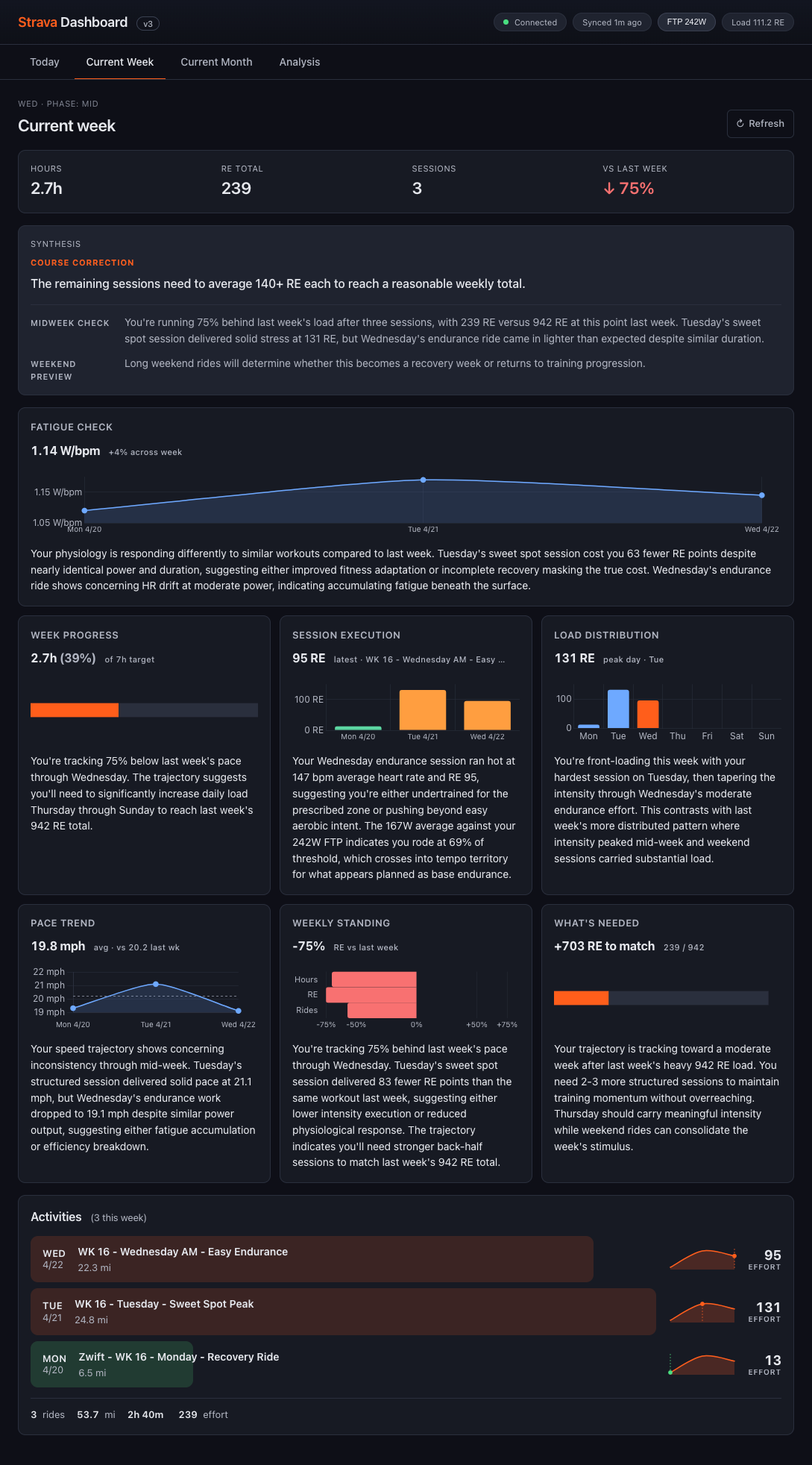
- Current Week — where today sits in the week's shape. Tuesday against Tuesday.
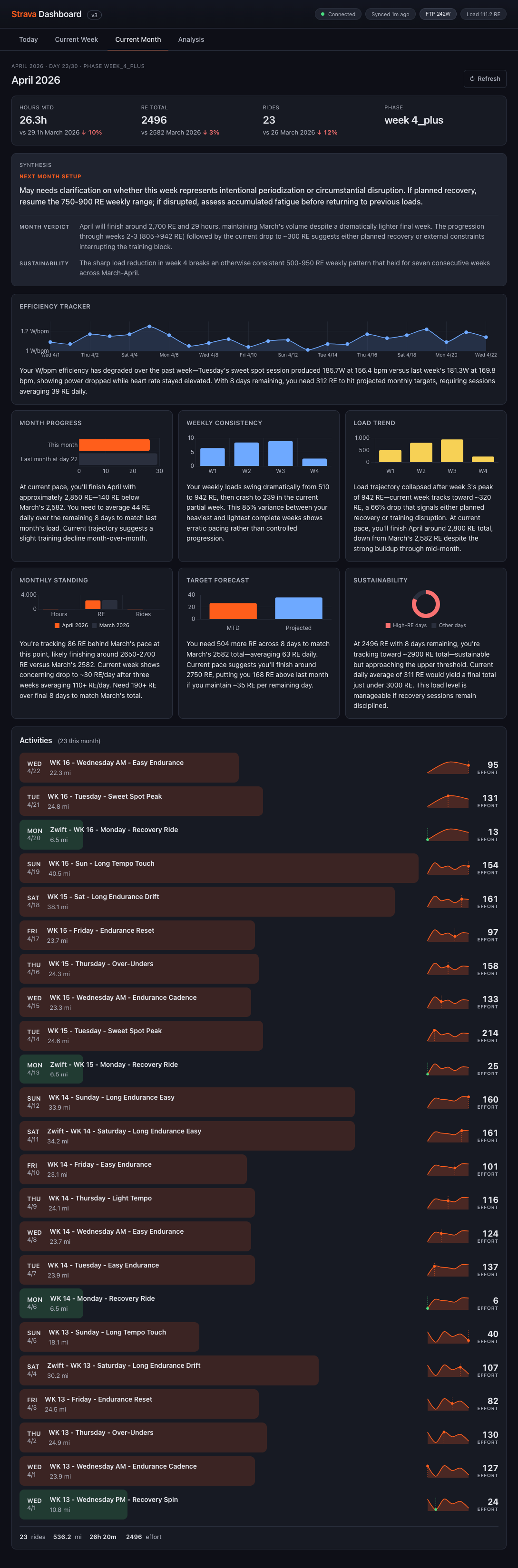
- Current Month — whether the month is tracking to target.
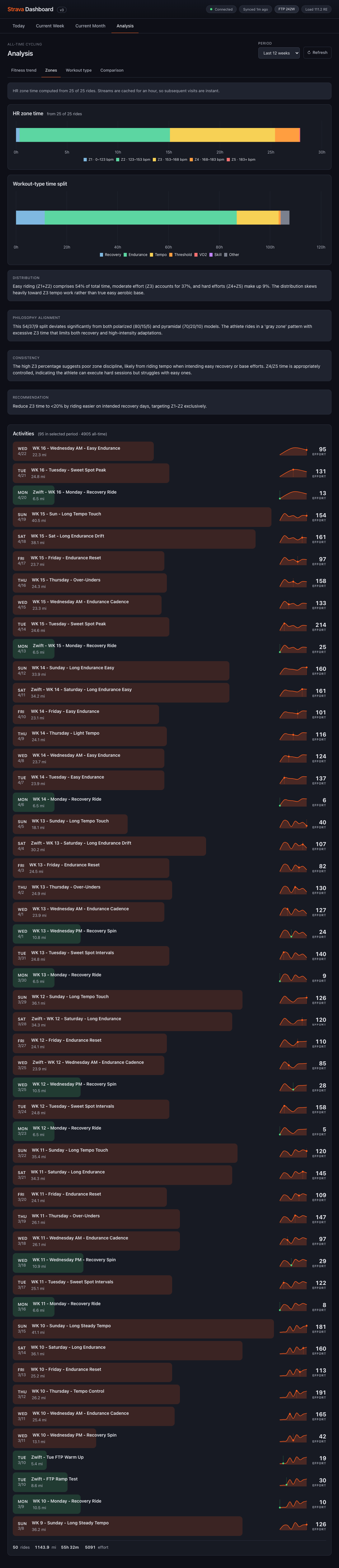
- Analysis — the 12-week pattern the month is part of.
One tab per horizon, no overlap. Open the tab that maps to your question, read the answer, close the tab.
Craft
Four decisions made the structure work rather than just exist.
Decision 01Synthesis as first-class content.
Charts answer what. Written synthesis answers so what. The syntheses are specific, reasoned, and written to be read once — they assume the reader can handle nuance and show the reasoning alongside the read.
The rule I was designing against was Strava's AI failure mode: if the synthesis could be cut and pasted onto any rider's week, it wasn't doing its job. I wrote the first two weeks of syntheses by hand to lock the voice — coach-in-your-ear rather than analyst-in-a-deck — then handed off to an LLM with those examples as style anchors.
Decision 02Reading order as the real design surface.
Each page resolves to a decision through an ordered read. Today opens with a takeaway paragraph, then the PMC, then red flags, then paired diagnostic cards (Execution, Power↔HR, Ride Cost, Week Shape) tagged Watch or On Target, then context modules for the week, month, and recovery HR, then a recommendation. The synthesis doesn't sit on top of the charts — the page is ordered so the charts become evidence for the sentences above them.
The reading order shifts with time. The top synthesis block adapts its framing to where in the window you are: Current Week on a Wednesday reads COURSE CORRECTION because there's still runway to change the back half of the week; Current Month on day 28 reads NEXT MONTH SETUP because the verdict is already written and the real question has moved on. Same tab, different question depending on when you open it.
Decision 03Relative Effort as the common unit.
Every other comparable metric had gaps — power meters die, Zwift calibration drifts, hardtail weekend rides have no W/kg at all. I standardized on Relative Effort (RE), a normalized score from heart rate and duration, and made every chart load on RE first. Power and W/bpm became optional secondary layers.
Decision 04Analysis as the long-memory tab.
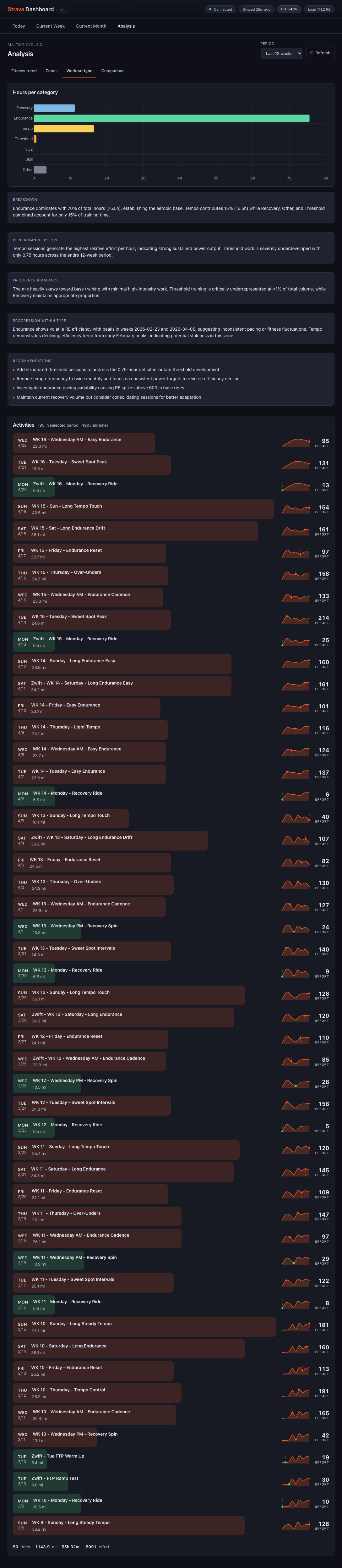
Twelve weeks is long enough to see a block, short enough to still be actionable. Four sub-views: Fitness trend, Zones, Workout type, Comparison. Workout type is the one that earns its keep most consistently — it surfaces what's missing, not just what's there.
A recent read: 70% Endurance, 15% Tempo, under 1% Threshold. That gap is invisible in any single week's data and obvious across twelve.

Build
The build was solo, end-to-end, with Claude Code. Design decisions and implementation decisions stayed in the same head. The synthesis rule survived contact with the codebase because there was no handoff to lose it across — when a chart didn't earn its sentence, I could cut it the same afternoon I noticed.
A personal project was the right vehicle because the question — what does a data product look like when synthesis is the object? — needed someone acting as designer, user, and coach at once, running the loop daily without a brief.
What it feels like now
It's the first thing I open in the morning after a ride, and the first thing I check before one. The old ritual — Fitness & Freshness, then the chart stack, then guessing — has been replaced by a new one: the Takeaway paragraph, then the charts if I want the evidence.
The Comparison view is the clearest version of this. Five synthesis blocks — Overview, Progression, Effort Distribution, Volume & Consistency, Coaching Synthesis — sit between the comparison bars and the activity list. I read the paragraphs first. The bars become reference material, not the read.

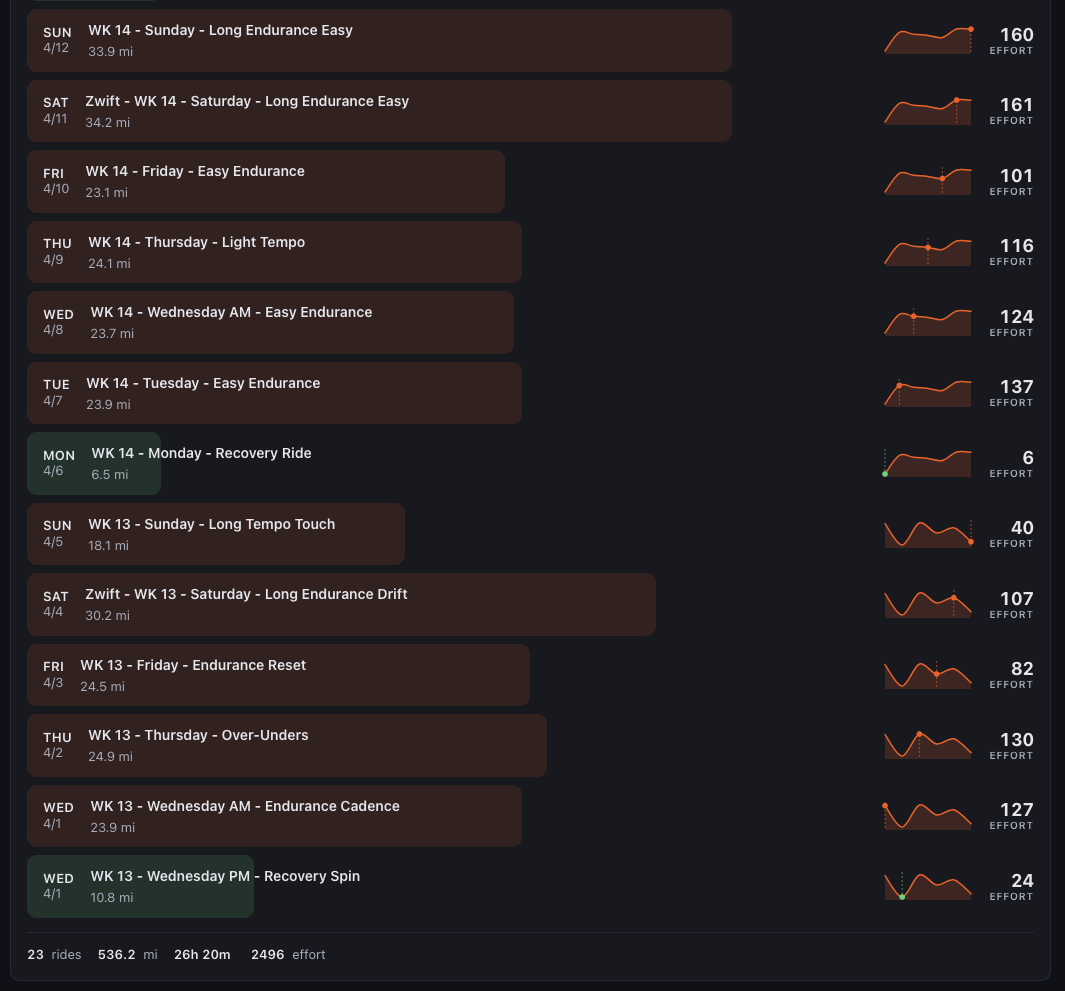
Beneath every synthesis view the raw activity log is always there — day by day, ride by ride, with effort sparklines and RE scores. Synthesis frames the data without hiding it.
The Fitness & Freshness line I didn't understand for a decade didn't move. It's still on the Today tab, still the PMC. What changed is what surrounds it — a takeaway paragraph above, red flags below, paired cards explaining execution and ride cost and where the week is shaped.
What's next
- Whoop integration — pull recovery, strain, and sleep data alongside ride load, so the synthesis can read physiological readiness against training demand rather than inferring it from HR alone.
- Additional analysis metrics — deeper cuts in the 12-week view: efficiency trends by workout type, fatigue-adjusted power, zone drift across blocks.
- Experimental data visualizations — prototype surfaces for patterns the current charts flatten. Same synthesis-first rule applies: if a new visualization can't earn a sentence, it doesn't ship.